Switch between OpenAI, Claude, and Gemini with one line of code
📚 Series Navigation: This is Post 2 of the Google ADK Tutorial Series.
← Previous: Introduction to Google ADK
What You’ll Learn
By the end of this post, you’ll:
- Understand how LiteLLM works with ADK
- Configure multiple LLM providers
- Switch between models without changing code
- Implement fallback strategies for reliability
- Optimize costs by choosing the right model for each task
Code on GitHub: The complete working example from this post is available at google-adk-samples/model_agnostic_agent
Why Model Agnosticism Matters
Building an AI agent often starts with one LLM provider, but production realities quickly change that:
- Cost optimization: GPT-5.2 is great but expensive; Gemini Flash is fast and cheap
- Availability: Provider outages happen; you need fallbacks
- Capability matching: Some models excel at code, others at reasoning
- Privacy requirements: Some use cases require local models
- Experimentation: Trying new models shouldn’t require rewrites
ADK solves this through LiteLLM - a unified interface to LLM providers.
How LiteLLM Works in ADK
LiteLLM acts as a translation layer between your code and LLM providers:
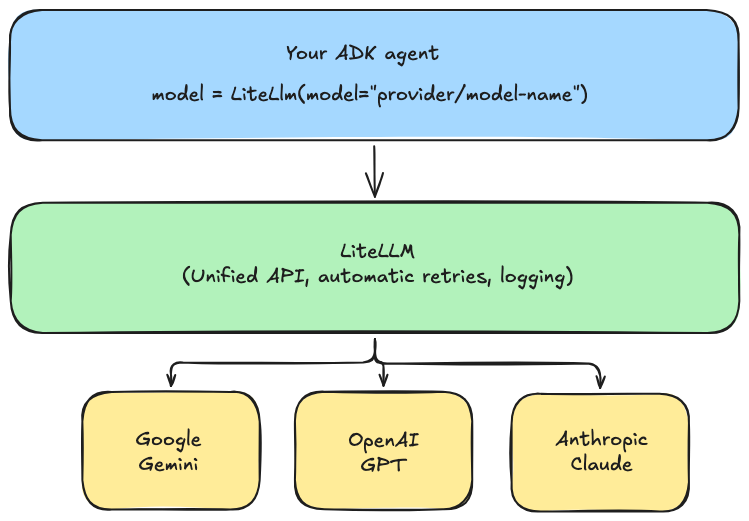
The model string format is always: provider/model-name
Setting Up Multiple Providers
Step 1: Set up your environment
# Create a new parent directory. All ADK agents will be created in this directory
mkdir agents
cd agents

# Create a virtual environment (recommended)
python -m venv .venv
source .venv/bin/activate  # On Windows: .venv\Scripts\activate

# Install Dependencies
pip install google-adk litellm

# Create the first agent
mkdir model_agnostic_agent
cd model_agnostic_agent
Step 2: Configure API Keys
Create a .env file with your API keys:
# Google Gemini
GOOGLE_API_KEY=your-google-api-key

# OpenAI
OPENAI_API_KEY=your-openai-api-key

# Anthropic
ANTHROPIC_API_KEY=your-anthropic-api-key
Step 3: Configure Model strings from different providers
In the .env file, configure the different models that you wish to use:
## AI Models from different providers

# Google Gemini models
LITELLM_MODEL="gemini/gemini-3-flash-preview"
#LITELLM_MODEL="gemini/gemini-3-pro-preview"

# OpenAI GPT models
#LITELLM_MODEL="openai/gpt-5.2"

# Anthropic Claude models
#LITELLM_MODEL="anthropoic/claude-sonnet-4-5-20250929"
#LITELLM_MODEL="anthropic/claude-opus-4-5-20251101"
Step 4: Load Environment Variables and Import packages
import os
from dotenv import load_dotenv
from google.adk.agents import LlmAgent
from google.adk.apps.app import App
from google.adk.models.lite_llm import LiteLlm

from dotenv import load_dotenv
load_dotenv()  # Load .env file
Step 5: Define the Tools for the Agent
# Hardcoded data for tools

WEATHER_DATA = {
	"new york": {"city": "New York", "temperature": "45°F", "condition": "Cloudy"},
	"atlanta": {"city": "Atlanta", "temperature": "72°F", "condition": "Sunny"},
	"chicago": {"city": "Chicago", "temperature": "28°F", "condition": "Snowy"},
	"miami": {"city": "Miami", "temperature": "82°F", "condition": "Partly Cloudy"}
}

STOCK_DATA = {
	"AAPL": {"ticker": "AAPL", "company": "Apple Inc.", "price": "$185.50"},
	"GOOGL": {"ticker": "GOOGL", "company": "Alphabet Inc.", "price": "$142.25"},
	"MSFT": {"ticker": "MSFT", "company": "Microsoft Corp.", "price": "$378.90"},
	"AMZN": {"ticker": "AMZN", "company": "Amazon.com Inc.", "price": "$178.35"}
}

# Tools

def get_weather(city: str) -> dict:
	"""Get the current weather for a city.

	Args:
	city: The name of the city

	Returns:
	Weather information for the city
	"""

	city_lower = city.lower().strip()
	if city_lower in WEATHER_DATA:
		return WEATHER_DATA[city_lower]
	return {
		"status": "unsupported",
		"message": f"Weather data not available for '{city}'. Supported cities: New York, Atlanta, Chicago, Miami"
	}

def get_stock_price(ticker: str) -> dict:
	"""Get the current stock price for a ticker symbol.

	Args:
	ticker: The stock ticker symbol (e.g., AAPL, GOOGL)

	Returns:
	Stock price information
	"""

	ticker_upper = ticker.upper().strip()
	if ticker_upper in STOCK_DATA:
		return STOCK_DATA[ticker_upper]
	return {
		"status": "unsupported",
		"message": f"Stock price not available for '{ticker}'. Supported tickers: AAPL, GOOGL, MSFT, AMZN"
	}
Step 6 - Define a function to get model for the Agent
We have already configured the different model strings and API keys from those providers in the .env file. We will define a small function to get the model that is active in the configuration.
# Set a default model to use if nothing is setup in .env file
DEFAULT_MODEL = "gemini/gemini-3-flash-preview"

def get_model():
"""Get the model from environment or use default."""
	model_string = os.getenv("LITELLM_MODEL", DEFAULT_MODEL)
	print(f"Using model: {model_string}")
	return LiteLlm(model=model_string)
Step 7 - Define the Agent and the App
# Create agent with configurable model

assistant = LlmAgent(
	name="assistant",
	model=get_model(), # Get the model dynamically instead of hardcoding it
	instruction="""You are a helpful assistant that can:
	- Answer questions using your knowledge
	- Get weather information for any city using get_weather tool
	- Get stock prices for any ticker symbol using get_stock_price tool

	Be concise and helpful in your responses.
	""",
	tools=[get_weather, get_stock_price]
)

app = App(
	name="model_agnostic_agent",
	root_agent=assistant
)
Step 8 - Run the agent
Note Make sure you are in the
agentsdirectory, the parent directory to the agent folder -model_agnostic_agentbefore you run the cli commands to run it.
Set different models (uncomment / comment) in the .env file and test with all the models from different providers.
adk web
Sample prompts to use
What is the weather in New York
What is the weather in London
What is the stock price of Microsoft
What is the stock price of Apple
Model String Reference
Here are the most common model strings for ADK:
Google Gemini
from google.adk.models.lite_llm import LiteLlm

# Gemini 3.0 - Latest and most capable
model = LiteLlm(model="gemini/gemini-3-flash-preview")
model = LiteLlm(model="gemini/gemini-3-pro-preview")
OpenAI
# GPT-5 Family
model = LiteLlm(model="openai/gpt-5.2")
model = LiteLlm(model="openai/gpt-5-mini")
Anthropic Claude
# Claude 4.5 Family
model = LiteLlm(model="anthropoic/claude-sonnet-4-5-20250929")
model = LiteLlm(model="anthropic/claude-opus-4-5-20251101")
Local Models (Ollama)
# Run models locally with Ollama
model = LiteLlm(model="ollama/llama3.2")    # Meta's Llama
model = LiteLlm(model="ollama/mistral")     # Mistral AI
model = LiteLlm(model="ollama/codellama")   # Code-focused
model = LiteLlm(model="ollama/phi3")        # Microsoft's small model
Building a Model-Agnostic Agent
Here’s a complete example that can use any provider:
"""
Model-Agnostic Agent Example
Change the LITELLM_MODEL environment variable to switch providers.
"""

import os
from dotenv import load_dotenv
from google.adk.agents import LlmAgent
from google.adk.apps.app import App
from google.adk.models.lite_llm import LiteLlm

load_dotenv()

# Configuration - change this to switch models
DEFAULT_MODEL = "gemini/gemini-3-flash-preview"


def get_model():
	"""Get the model from environment or use default."""
	model_string = os.getenv("LITELLM_MODEL", DEFAULT_MODEL)
	print(f"Using model: {model_string}")
	return LiteLlm(model=model_string)


# Hardcoded data for tools
WEATHER_DATA = {
	"new york": {"city": "New York", "temperature": "45°F", "condition": "Cloudy"},
	"los angeles": {"city": "Los Angeles", "temperature": "72°F", "condition": "Sunny"},
	"chicago": {"city": "Chicago", "temperature": "28°F", "condition": "Snowy"},
	"miami": {"city": "Miami", "temperature": "82°F", "condition": "Partly Cloudy"}
}


STOCK_DATA = {
	"AAPL": {"ticker": "AAPL", "company": "Apple Inc.", "price": "$185.50"},
	"GOOGL": {"ticker": "GOOGL", "company": "Alphabet Inc.", "price": "$142.25"},
	"MSFT": {"ticker": "MSFT", "company": "Microsoft Corp.", "price": "$378.90"},
	"AMZN": {"ticker": "AMZN", "company": "Amazon.com Inc.", "price": "$178.35"}
}


# Tools

def get_weather(city: str) -> dict:
	"""Get the current weather for a city.

	Args:
	city: The name of the city

	Returns:
	Weather information for the city
	"""
	city_lower = city.lower().strip()
	if city_lower in WEATHER_DATA:
		return WEATHER_DATA[city_lower]
	return {
		"status": "unsupported",
		"message": f"Weather data not available for '{city}'. Supported cities: New York, Los Angeles, Chicago, Miami"
	}


def get_stock_price(ticker: str) -> dict:
	"""Get the current stock price for a ticker symbol.

	Args:
	ticker: The stock ticker symbol (e.g., AAPL, GOOGL)

	Returns:
	Stock price information
	"""
	ticker_upper = ticker.upper().strip()
	if ticker_upper in STOCK_DATA:
		return STOCK_DATA[ticker_upper]
	return {
		"status": "unsupported",
		"message": f"Stock price not available for '{ticker}'. Supported tickers: AAPL, GOOGL, MSFT, AMZN"
	}


# Create agent with configurable model
assistant = LlmAgent(
	name="assistant",
	model=get_model(), # Get the model dynamically instead of hardcoding it
	instruction="""You are a helpful assistant that can:
	- Answer questions using your knowledge
	- Get weather information for any city using get_weather tool
	- Get stock prices for any ticker symbol using get_stock_price tool

	Be concise and helpful in your responses.
	""",
	tools=[get_weather, get_stock_price]
)

app = App(
	name="model_agnostic_agent",
	root_agent=assistant
)
Running with Different Models
Note Make sure you are in the
agentsdirectory, the parent directory to the agent folder -model_agnostic_agentbefore you run the cli commands to run it.
Set different models (uncomment / comment) in the .env file and test with all the models from different providers.
# Default (Gemini 3 Flash)
adk web
Advanced: Model Configuration Options
LiteLLM supports additional configuration parameters:
from google.adk.models.lite_llm import LiteLlm

# Basic configuration
model = LiteLlm(
    model="openai/gpt-5.2",
)

# With additional parameters passed to the model
model = LiteLlm(
    model="openai/gpt-5.2",
    temperature=0.7,           # Creativity (0.0 = deterministic, 1.0 = creative)
    max_tokens=4096,           # Maximum response length
    top_p=0.9,                 # Nucleus sampling
)
Implementing Fallback Strategies
For production systems, you want automatic fallbacks when a provider fails:
"""
Agent with Fallback Models
Tries primary model, falls back to alternatives on failure.
"""

import os
from dotenv import load_dotenv
from google.adk.agents import LlmAgent
from google.adk.apps.app import App
from google.adk.models.lite_llm import LiteLlm

load_dotenv()


# Fallback chain - try in order
MODEL_FALLBACK_CHAIN = [
    "gemini/gemini-3-flash-preview",      # Primary: fast and cheap
    "openai/gpt-5-mini",           # Fallback 1: OpenAI
    "anthropoic/claude-sonnet-4-5-20250929",  # Fallback 2: Anthropic
]


def create_model_with_fallback():
    """
    Create a model, trying each in the fallback chain.
    In production, you'd implement proper retry logic.
    """
    # For simplicity, we'll use the primary model
    # LiteLLM has built-in fallback support via router
    primary_model = os.getenv("LITELLM_MODEL", MODEL_FALLBACK_CHAIN[0])
    return LiteLlm(model=primary_model)


# For more sophisticated fallbacks, use LiteLLM's Router
def create_model_with_router():
    """
    Use LiteLLM Router for automatic fallbacks.
    This is more robust for production use.
    """
    from litellm import Router

    # Define model configurations
    model_list = [
        {
            "model_name": "primary",
            "litellm_params": {
                "model": "gemini/gemini-3-flash-preview",
                "api_key": os.getenv("GOOGLE_API_KEY")
            }
        },
        {
            "model_name": "primary",  # Same name = fallback
            "litellm_params": {
                "model": "openai/gpt-5-mini",
                "api_key": os.getenv("OPENAI_API_KEY")
            }
        },
        {
            "model_name": "primary",  # Same name = fallback
            "litellm_params": {
                "model": "anthropic/claude-sonnet-4-5-20250929",
                "api_key": os.getenv("ANTHROPIC_API_KEY")
            }
        }
    ]

    router = Router(
        model_list=model_list,
        fallbacks=[{"primary": ["primary"]}],  # Fallback to same group
        retry_after=5,  # Retry after 5 seconds
        num_retries=3   # Retry 3 times
    )

    return router


# Simple example using primary model
assistant = LlmAgent(
    name="assistant",
    model=create_model_with_fallback(),
    instruction="You are a helpful assistant.",
    tools=[]
)


app = App(
    name="fallback_agent",
    root_agent=assistant
)
Cost Optimization - Use Cheaper Models for Simple Tasks
Different models have vastly different costs. Here’s how to optimize:
"""
Multi-Model Agent: Different models for different tasks
"""

from google.adk.agents import LlmAgent, SequentialAgent
from google.adk.apps.app import App
from google.adk.models.lite_llm import LiteLlm


# Cheap, fast model for simple tasks
fast_model = LiteLlm(model="gemini/gemini-3-flash-preview")

# More capable model for complex reasoning
smart_model = LiteLlm(model="gemini/gemini-3-pro-preview")


# Simple classifier agent - uses cheap model
classifier_agent = LlmAgent(
    name="classifier",
    model=fast_model,
    instruction="""Classify the user's request into one of these categories:
    - SIMPLE: Basic questions, greetings, simple lookups
    - COMPLEX: Requires reasoning, analysis, or multi-step thinking

    Respond with just the category name.
    """,
    tools=[]
)


# Main assistant - uses smarter model
main_agent = LlmAgent(
    name="main_assistant",
    model=smart_model,
    instruction="""You are a helpful assistant. Answer the user's question
    thoroughly and accurately.
    """,
    tools=[]
)
Using Local Models with Ollama
For privacy-sensitive applications or development without API costs:
Step 1: Install Ollama
# macOS
brew install ollama

# Linux
curl -fsSL https://ollama.com/install.sh | sh

# Windows - download from ollama.com
Step 2: Pull a Model
# Pull Llama 3.2 (8B parameters, good balance)
ollama pull llama3.2

# Pull Mistral (7B, fast)
ollama pull mistral

# Pull CodeLlama (for code tasks)
ollama pull codellama
Step 3: Start Ollama Server
ollama serve
Step 4: Use in ADK
from google.adk.models.lite_llm import LiteLlm

# Use local Ollama model
model = LiteLlm(model="ollama/llama3.2")

# Ollama runs on localhost:11434 by default
# LiteLLM connects automatically
Troubleshooting
“Model not found” Error
litellm.exceptions.NotFoundError: Model not found
Solution: Check the model string format. It should be provider/model-name:
- ✅
gemini/gemini-3-flash-preview - ❌
gemini-3-flash-preview - ❌
google/gemini-3-flash-preview
“Authentication failed” Error
litellm.exceptions.AuthenticationError: Invalid API Key
Solution:
- Check your
.envfile has the correct variable name - Ensure
load_dotenv()is called before creating the model - Verify the API key is valid and has proper permissions
“Rate limit exceeded” Error
litellm.exceptions.RateLimitError: Rate limit exceeded
Solution:
- Implement exponential backoff
- Use a fallback model
- Reduce request frequency
- Upgrade your API tier
Ollama Connection Error
Connection refused: localhost:11434
Solution:
- Start Ollama:
ollama serve - Verify it’s running:
curl http://localhost:11434/api/tags - Check if the model is downloaded:
ollama list
Resources
📚 Series Navigation ← Previous: Introduction to Google ADK → Next: Building Custom Tools for ADK Agents